
Encountering PXE-E99: Unexpected Network Error during SCCM OSD can be frustrating, especially when it happens randomly across machines. This guide walks you through the root cause of the issue, explains why SCCM fails to recognize certain devices, and provides step-by-step troubleshooting methods using SMSPXE logs and database cleanup. By the end, you’ll know exactly how to resolve PXE boot failures and ensure smoother OS deployments.
Issue
During Operating System Deployment (OSD) with Configuration Manager (SCCM), the PXE boot process may intermittently fail on certain machines, displaying the PXE‑E99: Unexpected Network Error.
>>Start PXE Over IPv4
Station IP address is : xx.xxx.xxx.xxx
Server IP address is : xx.xxx.xxx.xxx
NBP filename is smsboot\x64\Wdsmgfw.efi
NBP filesize is 0 bytes
PXE-E99: Unexpected network error.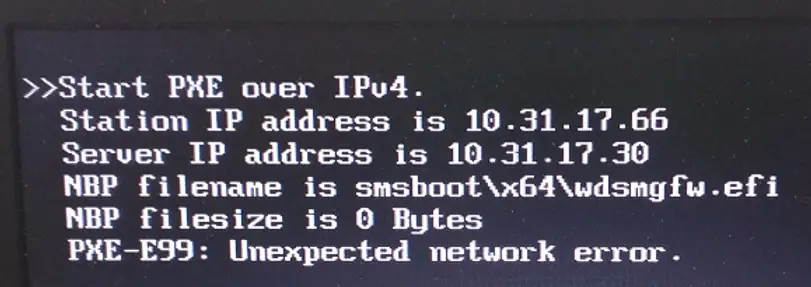
Cause:
This issue can occur when the SCCM OSD Task Sequence is deployed only to the Unknown Computers collection. If the machine was previously built, a record already exists in the SCCM database. As a result, the device is no longer treated as an unknown computer, and SCCM does not find any active deployment for it. Consequently, the PXE‑enabled Distribution Point rejects the boot image request.
Solution
The quickest way to locate a machine record in SCCM is by searching with its MAC address. This can be done directly from the Configuration Manager console or through a ConfigMgr report. However, in many cases, no record may be found in SCCM using the MAC address alone.”

We need to dig deeper in that case. The SMSPXE.log on the PXE-enabled Distribution Point comes to our rescue.
Open smspxe.log in CMTrace and try PXE boot on the problematic machine. You can find the real-time logs for the machine communicating with the PXE-enabled DP. See what’s happened in our case.
We tried to find the machine in SCCM using the device MAC address, but we could not find any records. However, the smspxe.log shows that the device is in the database, and it could not find any deployment available for the device.
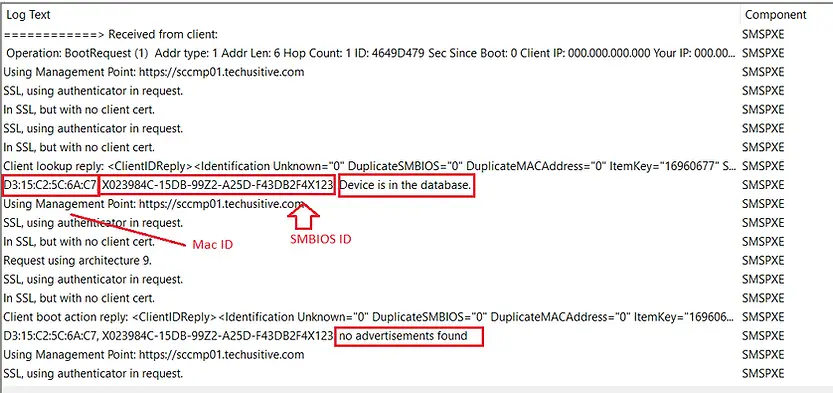
D3:15:C2:5C:6A:C7, X023984C-15DB-99Z2-A25D-F43DB2F4X123: Device is in the database.
D3:15:C2:5C:6A:C7, X023984C-15DB-99Z2-A25D-F43DB2F4X123: no advertisements found
Next, we searched for the device record in the SCCM console using the SMBIOS ID and successfully located it. After deleting the existing record from the Configuration Manager database, the machine was treated as an Unknown Computer. On the subsequent PXE boot attempt, the OSD Task Sequence was detected, and the PXE‑E99 error was resolved.

Related Posts:
- SCCM OSD – Domain Join Failed with Error code 0x54b on HP Elitebook 840 G8
- PXE-E99: Unexpected network error – SCCM OSD
- Location of smsts.log file during SCCM OSD
- ConfigMgr OSD – PXE Troubleshooting
- OSD Task Sequence Failed with Error 0x80072EE7
- Configuration Manager OSD task sequence fails with error code 0x80004005
Explore More SCCM Guides
Continue building your Microsoft Intune & SCCM skills with step-by-step tutorials covering device management, application deployment, automation, and troubleshooting.
- Microsoft Intune Learning – Explore comprehensive guides on device enrollment, compliance policies, application deployment, Windows updates, and more.
- SCCM (Configuration Manager) Guides – Explore more SCCM guides covering device management, application deployment, software updates, troubleshooting, and automation.
