
When enrolling Windows devices into Microsoft Intune, administrators may encounter the error code 0x800705b4, often during the Device Preparation stage. This error typically occurs when Bring Your Own Device (BYOD) enrollment is blocked by Intune’s platform restriction policies. While the message itself can be frustrating, the underlying cause is straightforward: Intune is preventing personal devices from joining due to policy settings. In this guide, we’ll walk through the root cause of error 0x800705b4 and provide clear steps to resolve it, ensuring a smoother enrollment experience for both IT admins and end users.
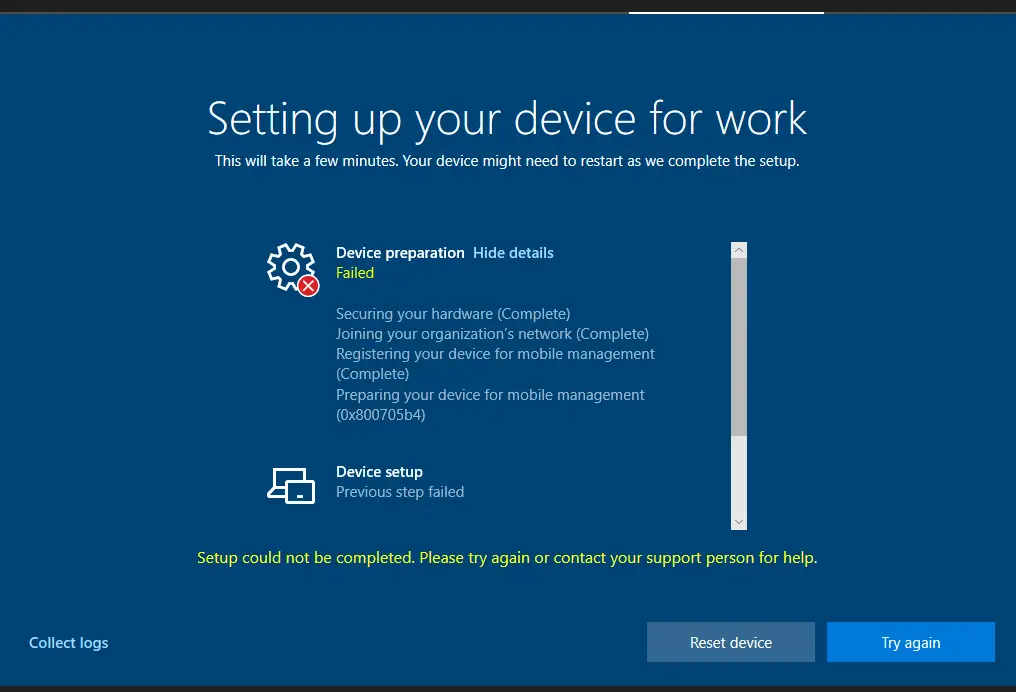
Issue: Intune BYOD enrollment error 0x800705b4
Stage: Device Preparation
Step: Preparing your device for mobile management (0x800705b4).
Error: Setup could not be completed. Please try again or contact your support person for help.
Causes of Intune Enrollment Error 0x800705b4
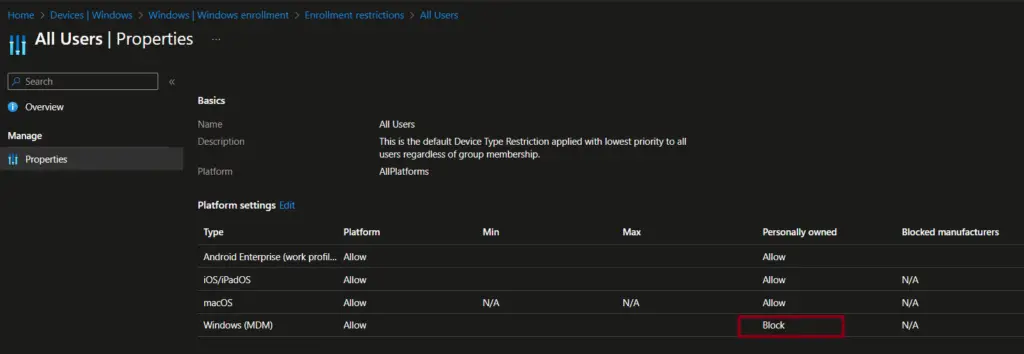
The device platform enrollment restriction policy can be used to block the enrollment of personally owned (BYOD) Windows devices. When you encounter this error, you should check the policy to confirm if BYOD devices are blocked.
Step-by-Step to Validate BYOD Enrollment Restrictions
Follow the steps below to check the device enrollment restriction policy.
- On the Intune admin center, navigate to Devices / Device onboarding / Enrollment
- Select Device platform restriction
- Click on Windows restrictions
- Under Device type restriction, click All users under the default restriction policy. If you have custom policies, then click on Policy name.
- Select Properties and validate the restriction settings configured for the policy.
As highlighted in the screenshot below, you can see that Windows MDM is blocked for personally owned (BYOD) devices.
Solution
The solution depends on the organization’s policy.
If your organization permits the enrollment of Windows BYOD (Bring Your Own Device) devices, you can resolve this error by editing the platform restriction policy and setting it to Allow. Once updated, personally owned Windows devices can be successfully enrolled in Intune.
If your organization does not allow enrollment of personally owned Windows 10 or later devices, there’s no direct fix available. In that case, the best approach is to engage with your IT decision-makers to discuss whether enabling BYOD enrollment aligns with your organization’s policies and security requirements.
Troubleshooting Table: Intune Enrollment Error 0x800705b4
| Error Stage | Possible Cause | Resolution |
|---|---|---|
| Device Preparation | BYOD enrollment blocked by Intune platform restriction policy | Edit the platform restriction policy → set Windows (BYOD) to Allow |
| Enrollment Attempt | Organization policy disallows personally owned Windows 10/11 devices | No direct fix. Contact IT decision-makers to discuss enabling BYOD enrollment |
| General Enrollment | Network/connectivity issues | Verify internet connection and retry enrollment |
| Policy Sync | Device not compliant with assigned policies | Review compliance policies and ensure the device meets requirements |
Related Posts
- Create ADE Enrollment Profile in Intune
- Dynamic Group Based on Enrollment Profile in Intune
- Intune Bulk Enrollment with Provisional Package failed with Error 0xCAA2000C
- Windows 11 enrollment failed with error 0x800700b7
- Bulk enrollment of Windows 10 / 11 Devices to Intune Using Provisioning Package
- How to Configure Enrollment Status Page (ESP) in Microsoft Intune
- How to Fix Intune Enrollment Error 0x800705b4
Explore More Intune Guides
Continue building your Microsoft Intune skills with step-by-step tutorials covering device management, application deployment, automation, and troubleshooting.
- Microsoft Intune Learning – Explore comprehensive guides on device enrollment, compliance policies, application deployment, Windows updates, and more.
- Device Management – Explore more device management guides covering Microsoft Intune, device configuration, enrollment, compliance, security, and Windows device management.
