
When deploying the SCCM client, administrators may encounter the dreaded installation failure with error code 0x87d0027e. This error typically occurs when the client setup cannot communicate properly with the Management Point (MP), often due to HTTPS misconfiguration, certificate trust issues, or incorrect command-line parameters. In this guide, we’ll break down the causes of error 0x87d0027e, walk through step-by-step troubleshooting, and share best practices to ensure a smooth SCCM client installation across your environment.
Issue 1: Download fails when the Management Point is configured to use HTTPS
The SCCM client installation failed with the following error when the management point was configured for HTTPS.
[CCMHTTP] ERROR: URL=http://CMSRV01.techuisitive.local/ccm_system/request, Port=80, Options=1248, Code=0, Text=CCM_E_BAD_HTTP_STATUS_CODE

Failed (0x87d0027e) to send location request to 'CMSRV01.techuisitive.local'. StatusCode 403, StatusText 'Forbidden'

GetDPLocations failed with error 0x87d0027e

Failed to get DP locations as the expected version from MP 'CMSRV01.techuisitive.local'. Error 0x87d0027e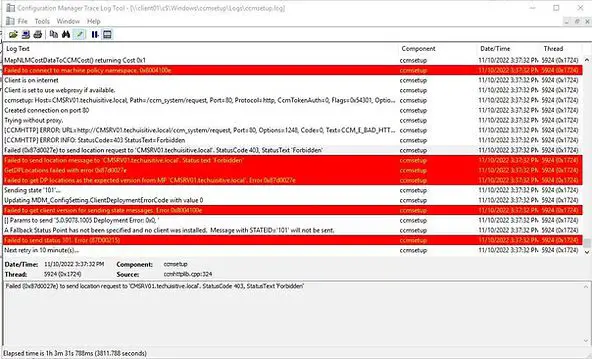
Solution for Error 0x87d0027e
When installing the Configuration Manager (SCCM) client from a Management Point (MP) configured for HTTPS, you must explicitly define the HTTPS properties using the /mp switch in the ccmsetup.exe command.
ccmsetup.exe SMSSITECODE=P01 /mp:https://mpserver.domain.com
SMSSITECODE=P01→ Site code where client should register/mp:→ Explicitly defines HTTPS Management Point
Related Posts:
- SCCM Application Deployment Failed with Error 0x87d01106 | ConfigMgr
- SCCM Client Installation Failed With Error Code 0x87d00215
- PXE-E99: Unexpected network error – SCCM OSD
- Configuration Manager OSD task sequence fails with error code 0x80004005
- MECM OSD Task Sequence Failed with Error 0x80072EE7
- SCCM Client Push Installation Failed with Error 0x800706ba
- Failed to Add Update Source for WUAgent of type (2) and id ({ID). Error = 0x80004005
- SCCM OSD – Domain Join Failed with Error code 0x54b on HP Elitebook 840 G8
- ccmsetup failed with error code 0x87d00227
- Fix Application Deployment error 0x87d00213 in ConfigMgr
- CMG Connection Point Status Disconnected | SCCM | ConfigMgr
- CMG Setup – Subscription ID drop down not populating
- CMG Setup – Error when granting Contributor permission to the Azure AD app
- Failed to connect with DP – Error Code 0x8004100e | ConfigMgr | SCCM
- SCCM Client Installation Failed with error 0x87d0027e
- ConfigMgr OSD – PXE Troubleshooting
- SCCM WSUS sync error – Sync Failed – WSUS server not configured
- SCCM Software Distribution Troubleshooting
Explore More SCCM Guides
Continue building your Microsoft Intune & SCCM skills with step-by-step tutorials covering device management, application deployment, automation, and troubleshooting.
- Microsoft Intune Learning – Explore comprehensive guides on device enrollment, compliance policies, application deployment, Windows updates, and more.
- SCCM (Configuration Manager) Guides – Explore more SCCM guides covering device management, application deployment, software updates, troubleshooting, and automation.
