
When deploying the Configuration Manager (ConfigMgr/SCCM) client using the push installation method, you may encounter the error 0x800706ba – The RPC server is unavailable. This error typically appears in ccm.log on the site server and indicates that the server was unable to establish a connection with the client over RPC ports. Common causes include blocked ports, firewall restrictions, or misconfigured security policies. In this guide, we’ll walk through the error details, root causes, and the required network/firewall configurations to successfully complete client push installation.
Issue:
The Configuration Manager client push installation failed with the following error.
Unable to connect to remote machine “Computer1.domain.com” using Kerberos with alternate account, error – 0x800706ba.
The ccm.log file on the ConfigMgr site server shows the following error details:
---> Connected to administrative share on machine Computer1.domain.com using account 'Domain\Account'
---> Attempting to make IPC connection to share <\Computer1.domain.com\IPC$> with Kerberos authentication
---> SspiEncodeStringsAsAuthIdentity succeeded for IPC$ authentication!
---> SspiExcludePackage succeeded for IPC$ authentication!
---> SspiMarshalAuthIdentity succeeded for IPC$ authentication!
---> NetUseAdd succeeded for IPC$ authentication!
---> Searching for SMSClientInstall.* under '\Computer1.domain.com\admin$\'
Submitted request successfully
---> Unable to connect to remote machine "Computer1.domain.com" using Kerberos with alternate account, error - 0x800706ba.
--> NTLM fallback is enabled, remote machine "Computer1.domain.com" is continuing with client push.
---> Unable to connect to remote machine "Computer1.domain.com" using Kerberos with alternate account, error - 0x800706ba.
---> Unable to connect to remote machine "Computer1" using Kerberos with machine account, error - 0x80070005.
---> Unable to connect to WMI on remote machine "Computer1.domain.com", error = 0x800706ba.
---> Unable to connect to WMI on remote machine "Computer1", error = 0x80070005.
--> NTLM fallback is enabled, remote machine "Computer1" is continuing with client push.
---> Unable to connect to WMI on remote machine "Computer1", error = 0x80070005.
---> Deleting SMS Client Install Lock File '\Computer1.domain.com\admin$\SMSClientInstall.P01'
Cause – RPC Connectivity
The above error indicates that the SCCM site server was unable to establish a connection with the client over RPC ports. This issue may occur due to the following reasons:
- RPC port 135 / Dynamic RPC ports are not open between the SCCM site server and the client.
- A firewall application installed on the client machine is blocking inbound traffic over RPC ports.
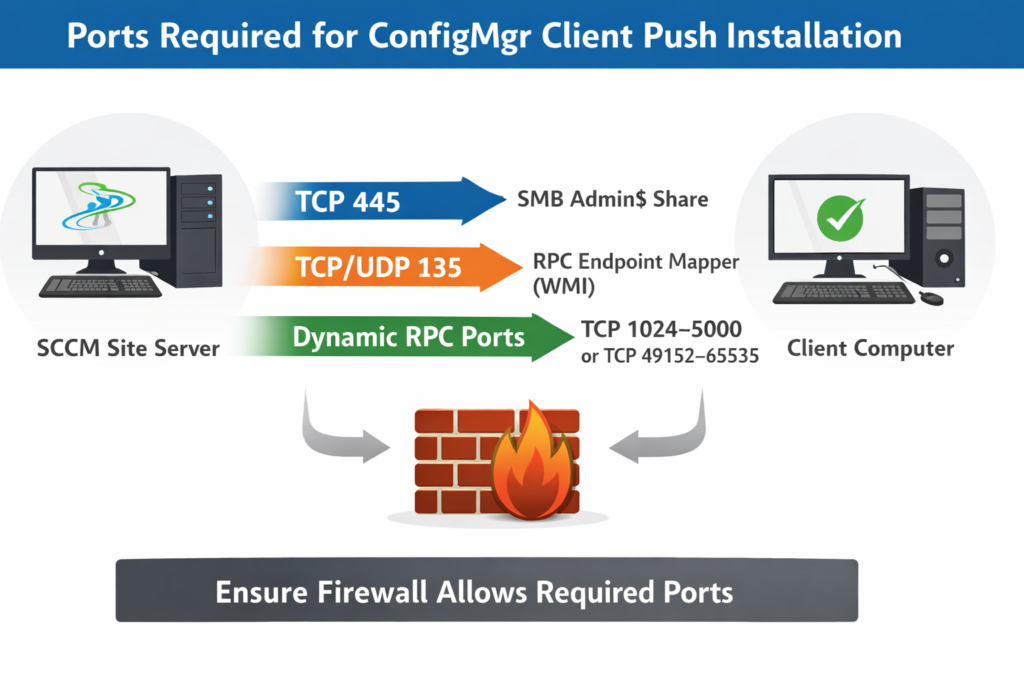
Infographic: SCCM Site Server ↔ Client Communication Over Required Ports. Visual summary of TCP 445 (SMB), TCP/UDP 135 (RPC), and dynamic RPC ports used during ConfigMgr client push installation.
Solution:
Ensure that all ports required for ConfigMgr client push installation are open and allowed through the network firewalls. Without proper RPC and SMB connectivity, the site server cannot establish communication with the client, resulting in error 0x800706ba (RPC server unavailable).
Ports Required for ConfigMgr Client Push Installation
The following ports must be open between the SCCM site server and client machines for client push installation to succeed:
- Server Message Block (SMB) – TCP 445 Used by the site server to connect to the admin$ share and copy the installation batch file to the client.
- Remote Procedure Call (RPC) – TCP/UDP 135 Used by the site server to connect with Windows Management Instrumentation (WMI) on the client. Once connected, the batch file is executed to initiate client installation.
- Remote Procedure Call (RPC) – Dynamic Ports
- TCP 1024–5000 (legacy range)
- TCP 49152–65535 (modern OS range). After the initial connection over port 135, subsequent communication occurs over dynamic ports randomly selected from these ranges.
Firewall Considerations
If all the above ports are allowed in the network firewall and you still encounter error 0x800706ba (RPC server unavailable), the issue may be caused by a local firewall application blocking inbound RPC traffic.
- Quick Test: Temporarily disable the firewall application on the client and retry client push.
- If successful: Work with your security team to configure permanent exceptions for SCCM communication.
Required Windows Defender Firewall Rules
The following applications/services must be allowed in Windows Defender Firewall:
- File and Print Sharing
- Windows Management Instrumentation (WMI)
- Remote Procedure Call (RPC)
Related Posts:
- SCCM Application Deployment Failed with Error 0x87d01106 | ConfigMgr
- SCCM Client Installation Failed With Error Code 0x87d00215
- PXE-E99: Unexpected network error – SCCM OSD
- Configuration Manager OSD task sequence fails with error code 0x80004005
- MECM OSD Task Sequence Failed with Error 0x80072EE7
- SCCM Client Push Installation Failed with Error 0x800706ba
- Failed to Add Update Source for WUAgent of type (2) and id ({ID). Error = 0x80004005
- SCCM OSD – Domain Join Failed with Error code 0x54b on HP Elitebook 840 G8
- ccmsetup failed with error code 0x87d00227
- Fix Application Deployment error 0x87d00213 in ConfigMgr
- CMG Connection Point Status Disconnected | SCCM | ConfigMgr
- CMG Setup – Subscription ID drop down not populating
- CMG Setup – Error when granting Contributor permission to the Azure AD app
- Failed to connect with DP – Error Code 0x8004100e | ConfigMgr | SCCM
- SCCM Client Installation Failed with error 0x87d0027e
- ConfigMgr OSD – PXE Troubleshooting
- SCCM WSUS sync error – Sync Failed – WSUS server not configured
- SCCM Software Distribution Troubleshooting
Explore More SCCM Guides
Continue building your Microsoft Intune & SCCM skills with step-by-step tutorials covering device management, application deployment, automation, and troubleshooting.
- Microsoft Intune Learning – Explore comprehensive guides on device enrollment, compliance policies, application deployment, Windows updates, and more.
- SCCM (Configuration Manager) Guides – Explore more SCCM guides covering device management, application deployment, software updates, troubleshooting, and automation.
