
Microsoft Intune provides several ways to deploy applications to managed Windows devices. Two commonly used application types are Line-of-Business (LOB) apps and Win32 apps.
Although both can be used to deploy applications to Windows devices, they differ significantly in packaging, installation options, detection, requirements, dependencies, and application lifecycle management.
This guide compares Intune LOB and Win32 apps and explains when to use each app type.
What is a Line of Business Application (LOB)
Line of Business Application (LOB) is a legacy application deployment method in Microsoft Intune. The LOB applications support a single file format such as .msi, .msix, .appx, etc. They only support simple installation. An MSI with a transform file (MST) cannot be deployed using this method. The LOB objects have limited capabilities, and they don’t support a few rich capabilities of the Configuration Manager Application Model, such as Detection methods & Dependencies.
Intune LOB applications are deployed through the Windows 10 / Windows 11 built-in MDM agent.
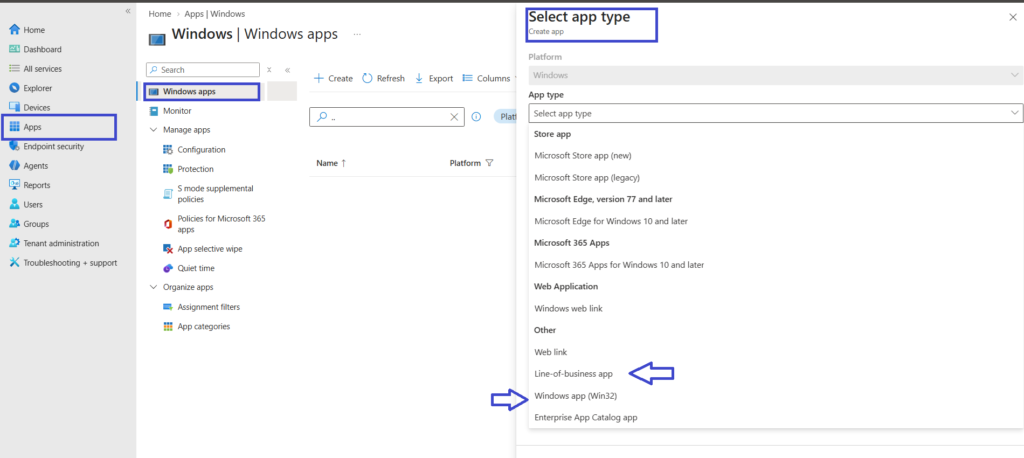
What is Windows Apps (Win32)
Win32 apps provide us greater control over the deployment of apps. The Win32 apps support deployment of multiple files via the IntuneWin wrapper (intuneWinAppUtil.exe). The IntuneWin Wrapper can be used to deploy multiple files, such as an MSI with a transform (MST). The Win32 app also supports the deployment of .EXE files by converting them to .intunewin format.
The Win32 apps also allow us to configure additional parameters similar to Configuration Manager application model features such as Requirements Rules, Detection methods, Dependencies & Supersedence.
The Win32 apps installation is handled by the Intune Management Extension. The Intune Management Extension is installed automatically when a PowerShell script or Win32 app is assigned to the user or device.
LOB vs Win32 comparison table
| Feature | LOB App | Win32 App |
|---|---|---|
| MSI | Yes | Yes |
| EXE | No | Yes |
| Multiple installation files | Limited | Yes |
| MST/Transform | No | Yes |
| Custom installation commands | Limited | Yes |
| Requirements | Limited | Yes |
| Detection rules | Limited | Yes |
| Dependencies | No | Yes |
| Supersedence | No | Yes |
| Custom uninstall command | Limited | Yes |
| Return codes | Limited | Yes |
| Installation context | Available options vary | System/User |
| Intune Management Extension | No | Yes |
| Best suited for | Simple MSI-based apps | Complex application deployments |
When should you use an Intune LOB app?
- Simple MSI application
- No custom installation logic required
- No dependencies
- No sophisticated detection requirements
- Application can be installed using the supported LOB package format
When should you use an Intune Win32 app?
- EXE installer
- MSI requiring MST
- Multiple installation files
- Custom installation parameters
- Custom detection logic
- Dependencies
- Supersedence
- Complex installation/uninstallation requirements
Why Win32 Apps Are Generally Preferred for Complex Applications
For simple MSI-based applications, a LOB app may be sufficient. For applications requiring custom installation commands, detection logic, dependencies, or application lifecycle management, Win32 apps generally provide greater flexibility.
Deploying the Win32 app from Intune has the following advantages:
- You can now deploy .exe files by converting them to the .intunewin format.
- Detection logic can be used to install the app only if it’s not detected as per the detection logic rule.
- Requirement rule can be used to install the app if defined criteria are met.
- Dependencies can be used to install the app along with dependent applications. This setting enables you to determine the sequence in which the app would be installed.
- Supersedence relationship can be used to supersede an older version of the application with a newer version.
Related Posts
- How to Deploy Google Chrome for Enterprise with Intune Win32 App
- Understanding Win32 App Detection Rules
- Understanding Win32 App Requirements Rule
- Upgrade / Replace Win32 Apps with Supersedence Relationship
Explore More Intune Guides
Continue building your Microsoft Intune skills with step-by-step tutorials covering device management, application deployment, automation, and troubleshooting.
- Microsoft Intune Learning – Explore comprehensive guides on device enrollment, compliance policies, application deployment, Windows updates, and more.
- Intune Application Deployment & Management – Learn how to manage applications with Microsoft Intune, including app deployment, assignment, detection rules, updates, and troubleshooting. Explore practical guides for Microsoft Store apps, Win32 apps, and other application types.
